
SERVICEORBIT
From a few words
to a routed ticket.
ServiceOrbit is a multi-tenant AI service desk — one platform that runs a separate, private desk for each organization. A requester chats, talks, or emails in plain language — the engine detects intent (what the requester is actually asking for), grounds the request in your written policy, parses the evidence, checks eligibility, and drafts a complete, routed ticket. No forms.
It covers the whole lifecycle — intake, approval, fulfilment, archive — with an AI assessment for every approver and SLA clocks (service-level agreement timers — the promised response time) that keep their own time. And a Service Engine that authors new catalogue services — new entries in the menu of requests your desk handles — from a department's real documents.
Live demo by invitation · invented organizations, not customers · For universities
No forms
The assistant builds the request itself — the requester just describes the need.
Every field traced
Each value on the ticket links back to the policy clause or document it came from.
AI + human
The engine knows when to decide and when to route to a person for judgement.
INTAKE, IN PLAIN LANGUAGE
Your team stops filling in forms.
A requester describes what they need — by chat, by voice, or by email — and the assistant does the rest: it finds the right service, asks for exactly what's missing, reads the attachments, and hands a clean, decided ticket to the approver. The work moves; nobody wrestles a portal.

THREE WAYS IN
Chat. Voice. Email. One engine behind all three.
Whichever way a request arrives, the same intelligence runs underneath — intent detection, policy grounding, document parsing, and a drafted ticket at the end.
Chat
RequesterA proactive assistant identifies the right catalogue service by purpose and audience, asks one question at a time, and builds the request itself. The requester never fills in a form.
Voice
RequesterA live speech-to-speech agent (built on OpenAI Realtime over WebRTC — live voice straight in the browser, nothing to install) that builds the ticket as you talk — natural conversation, structured outcome, and short-lived (ephemeral) security keys created on the server.
Inbound department email is auto-triaged into a routed, AI-drafted reply — the same intent detection and policy grounding, applied to the channel your requesters already use.
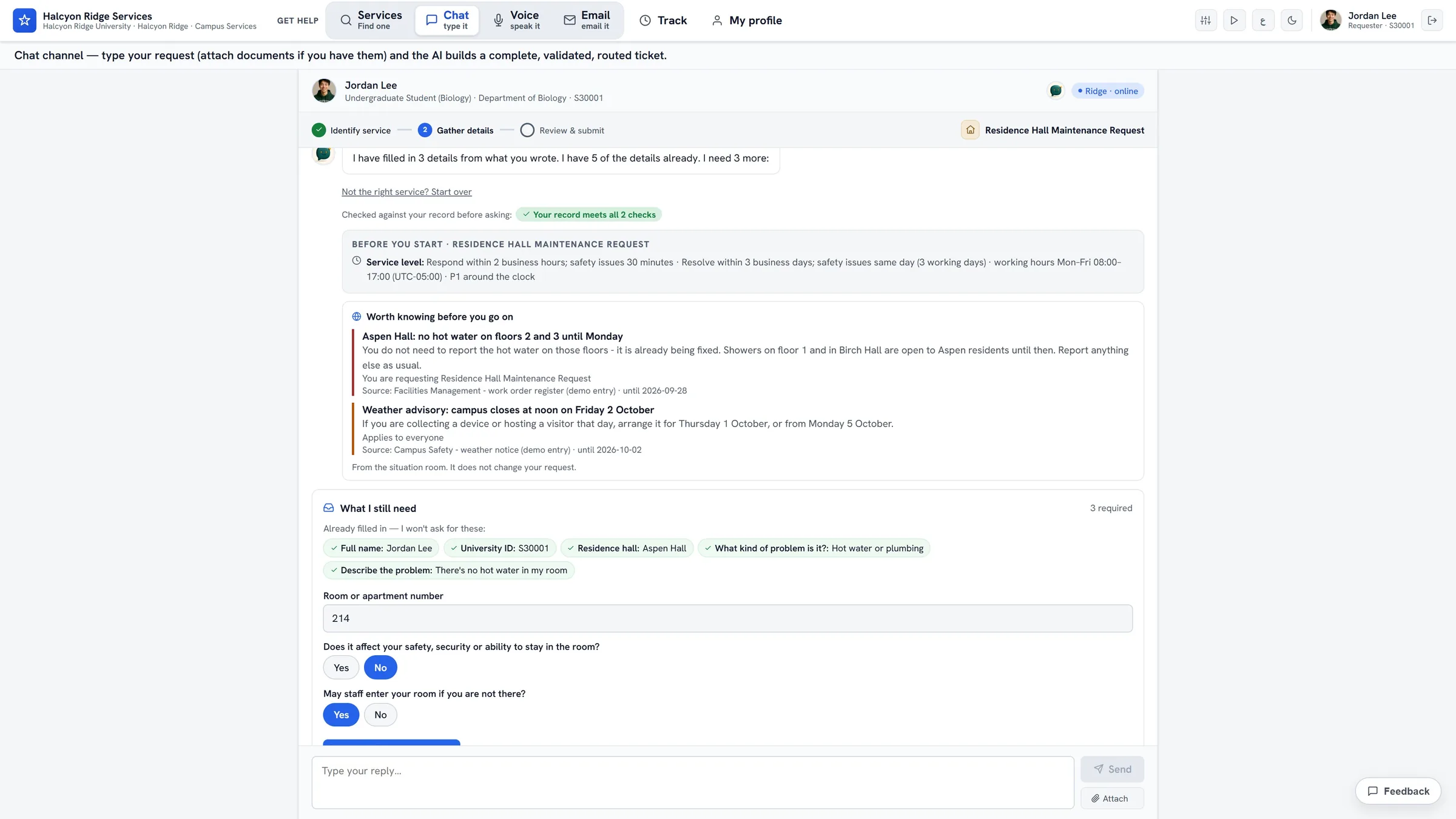
THE FULL LIFECYCLE
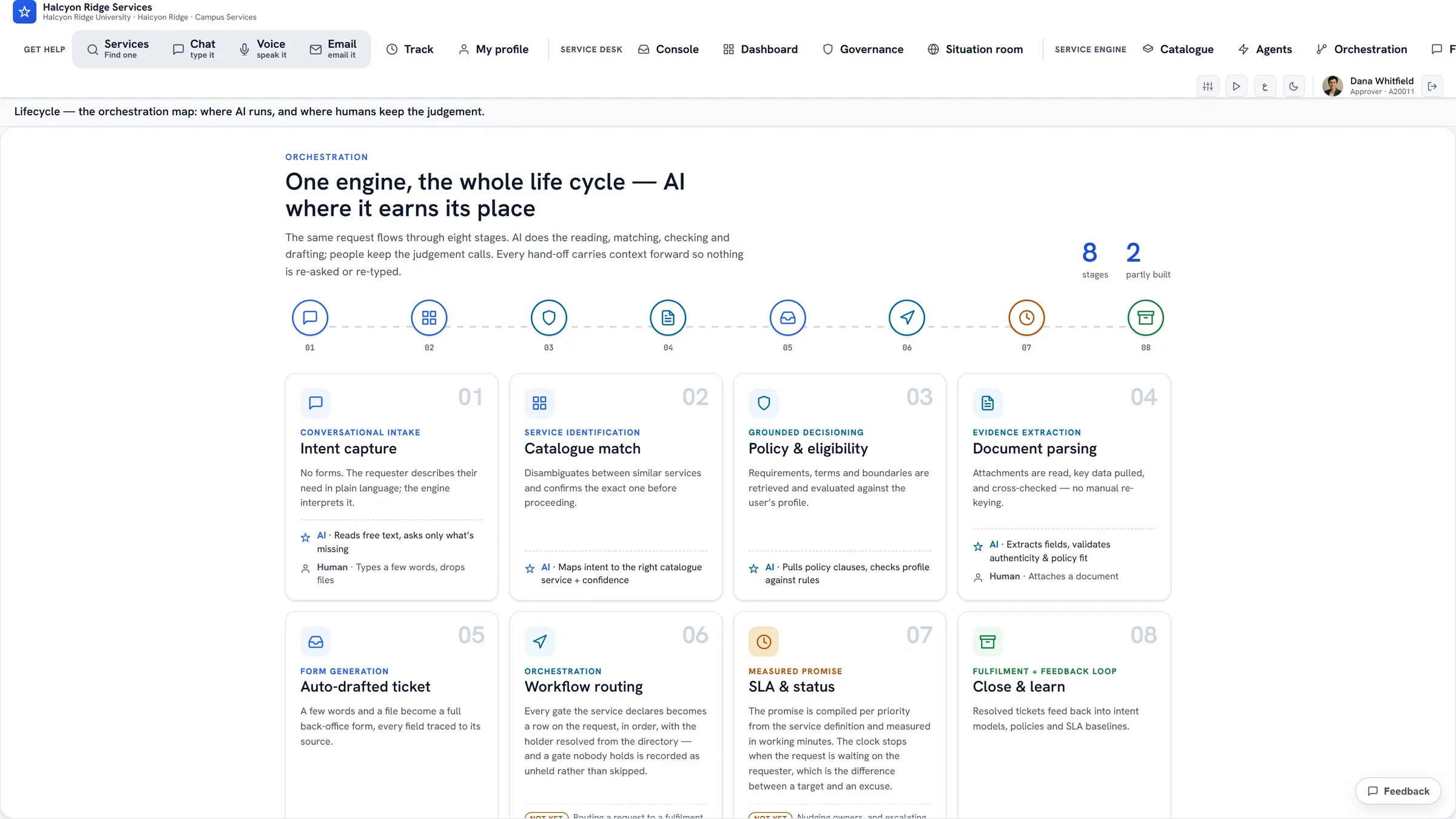
Eight stages, intake to archive.
The engine injects an LLM (a large language model — the AI that reads and writes text) at every point where it adds value — and stops where human judgement belongs. This is the orchestration map the platform actually runs.
01
Converse & detect intent
Plain-language chat, voice, or email. The assistant identifies the right service by purpose and audience.
02
Ground in policy
Pulls the service’s policy clauses, rules, exclusions, and the requirements checklist.
03
Parse documents
Extracts structured fields from PDF/image uploads via vision — in-memory; only extracted fields persist.
04
Evaluate eligibility
Checks each criterion against the requester profile and the submitted evidence.
05
Decide
Proceeds, routes to a human approver, holds for a fix, or declines — and knows when not to auto-decide.
06
Draft the ticket
A legible, structured ticket where every field traces back to its source.
07
Route the workflow
A persisted AI assessment per approver — recommendation plus per-criterion verdicts judged against the actual policy.
08
Track SLA & status
Business-hours SLA clocks that pause on “waiting for requester,” proactive updates, and outbound Slack notifications.
SEE IT RUNNING
The actual product, up close.
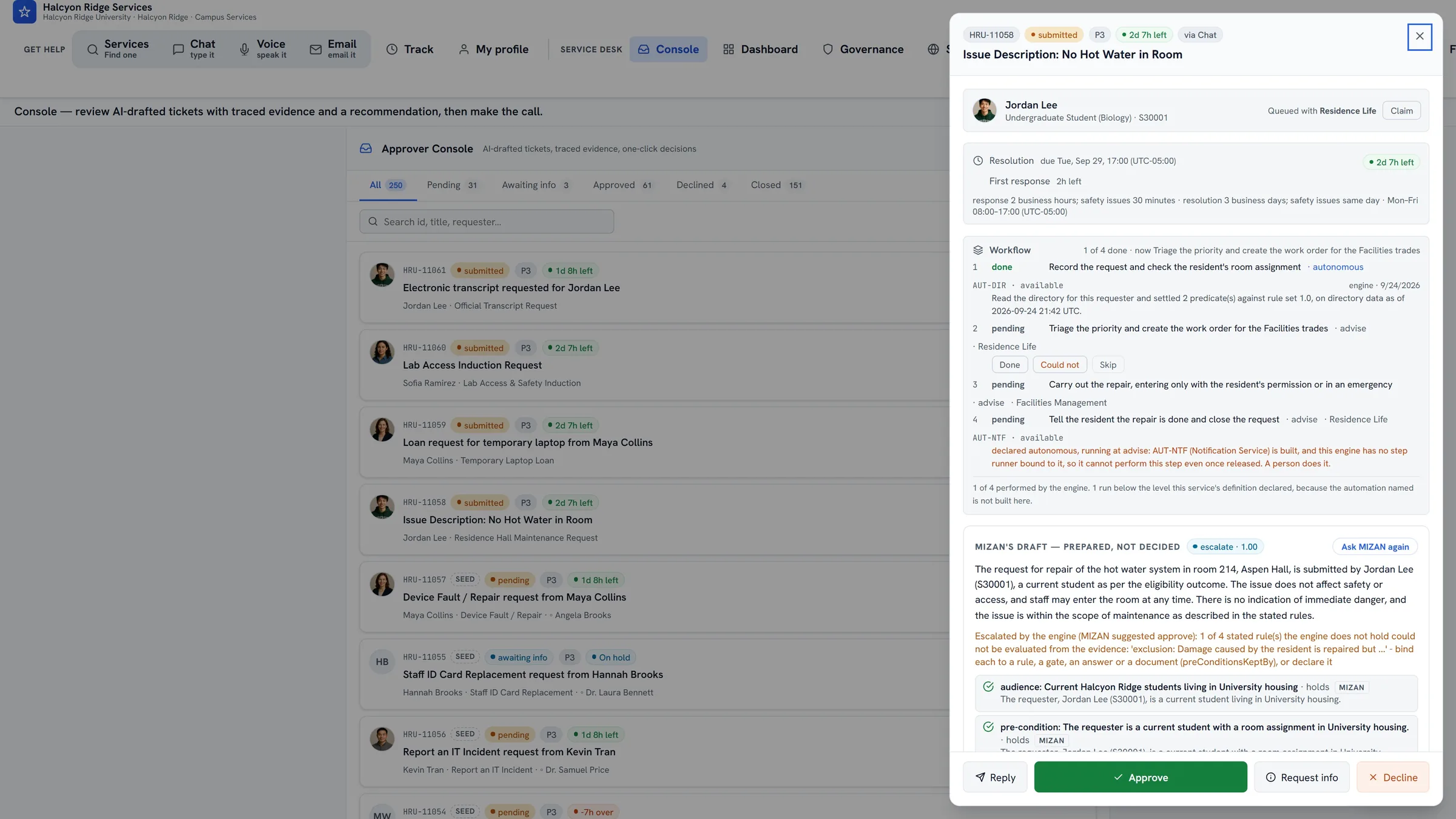
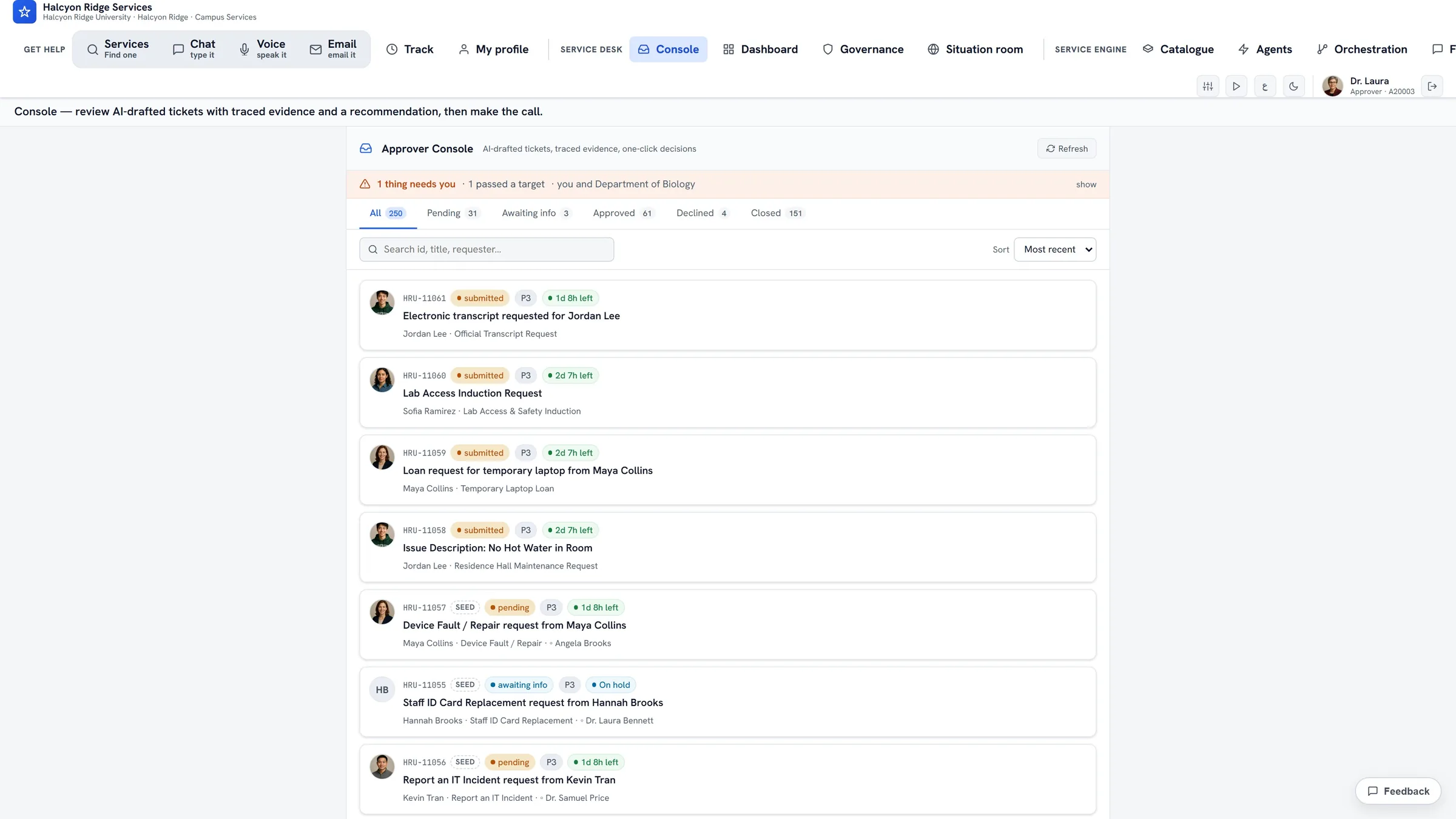
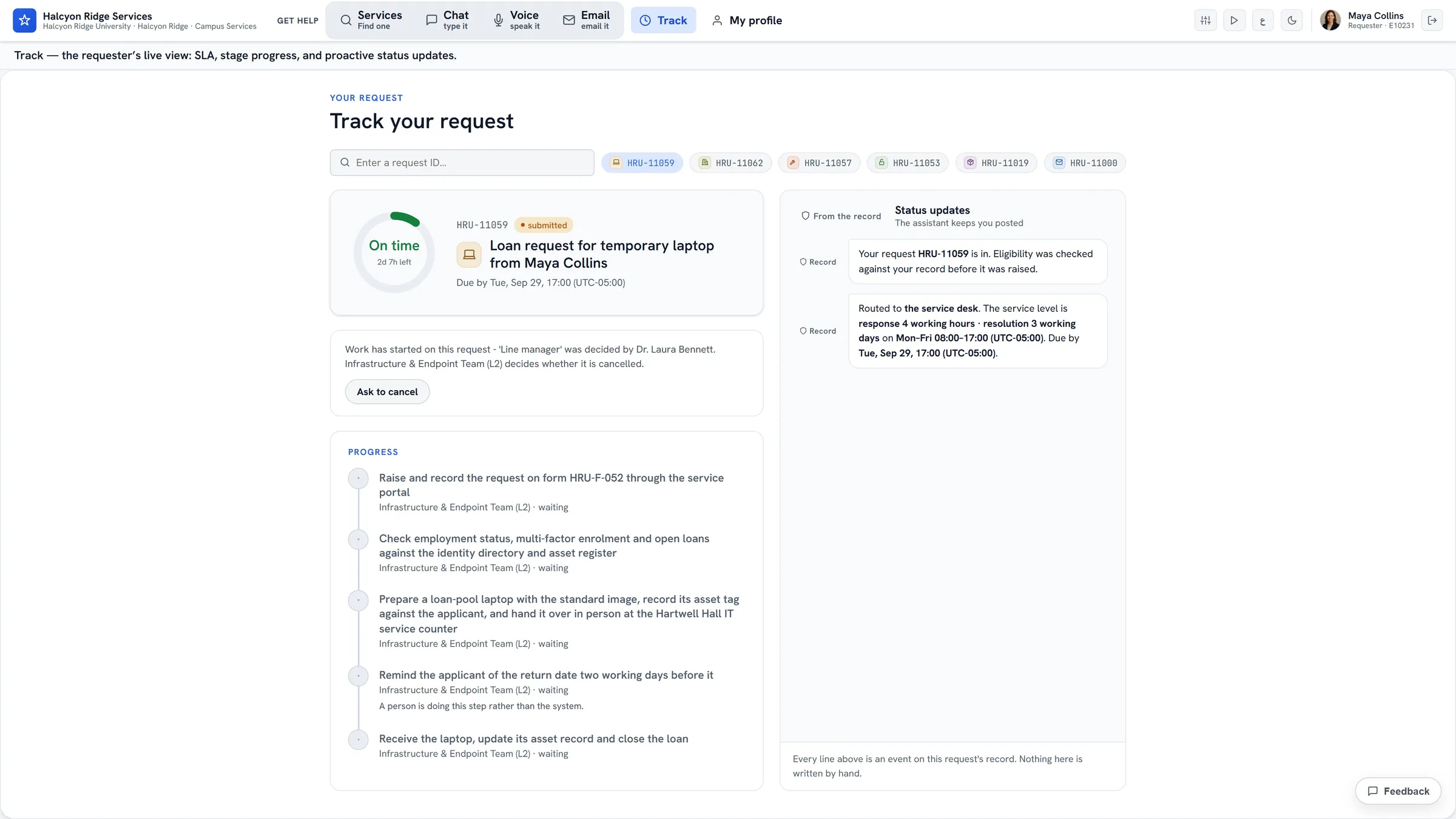
Screens from the working product, running Halcyon Ridge University, an invented campus. The orchestration map, the approver console and its queue, and the requester's status page. Every person and record shown is invented.
MEASURE, THEN IMPROVE
Run the desk by the numbers — and let the engine improve it.
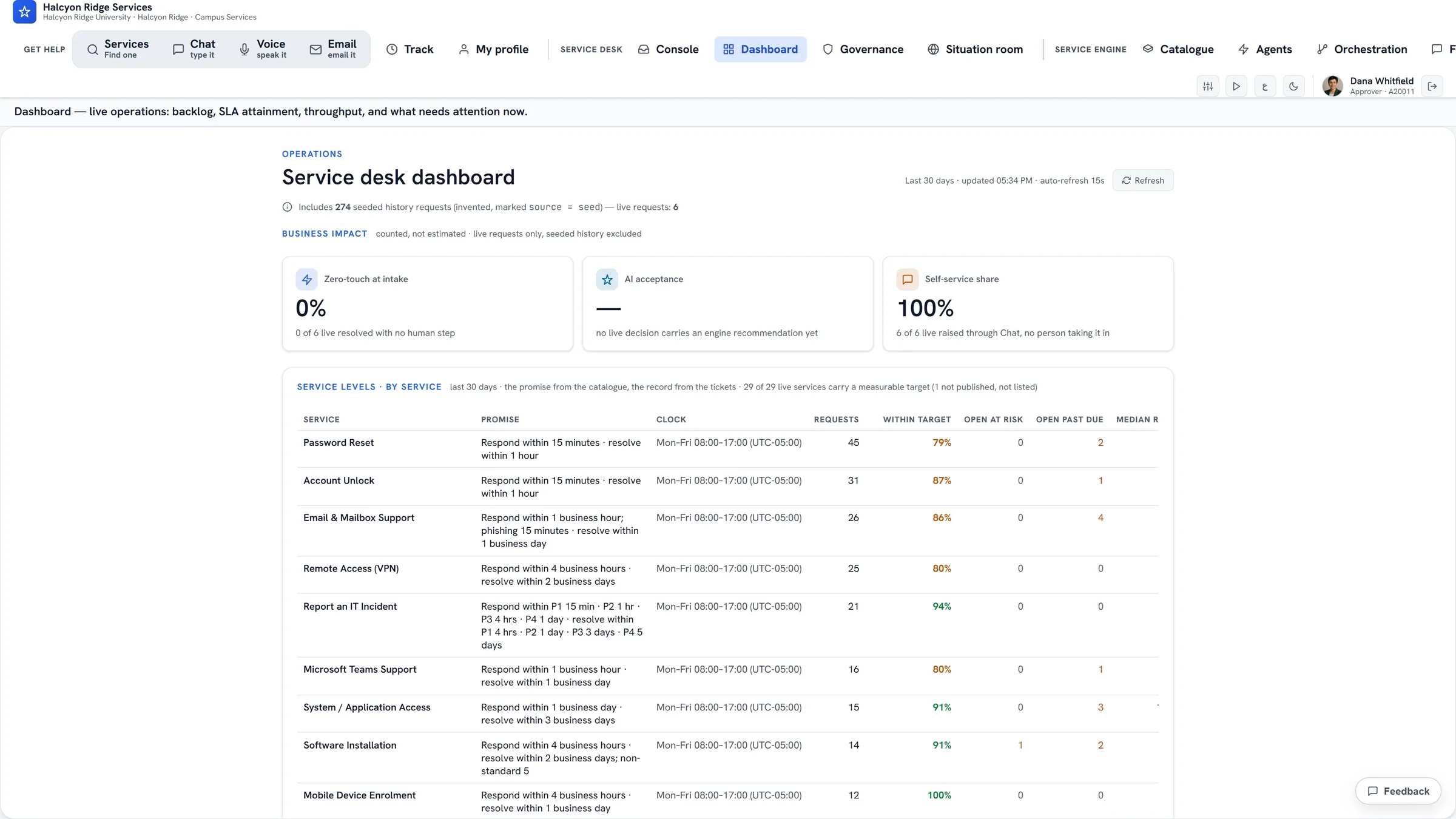
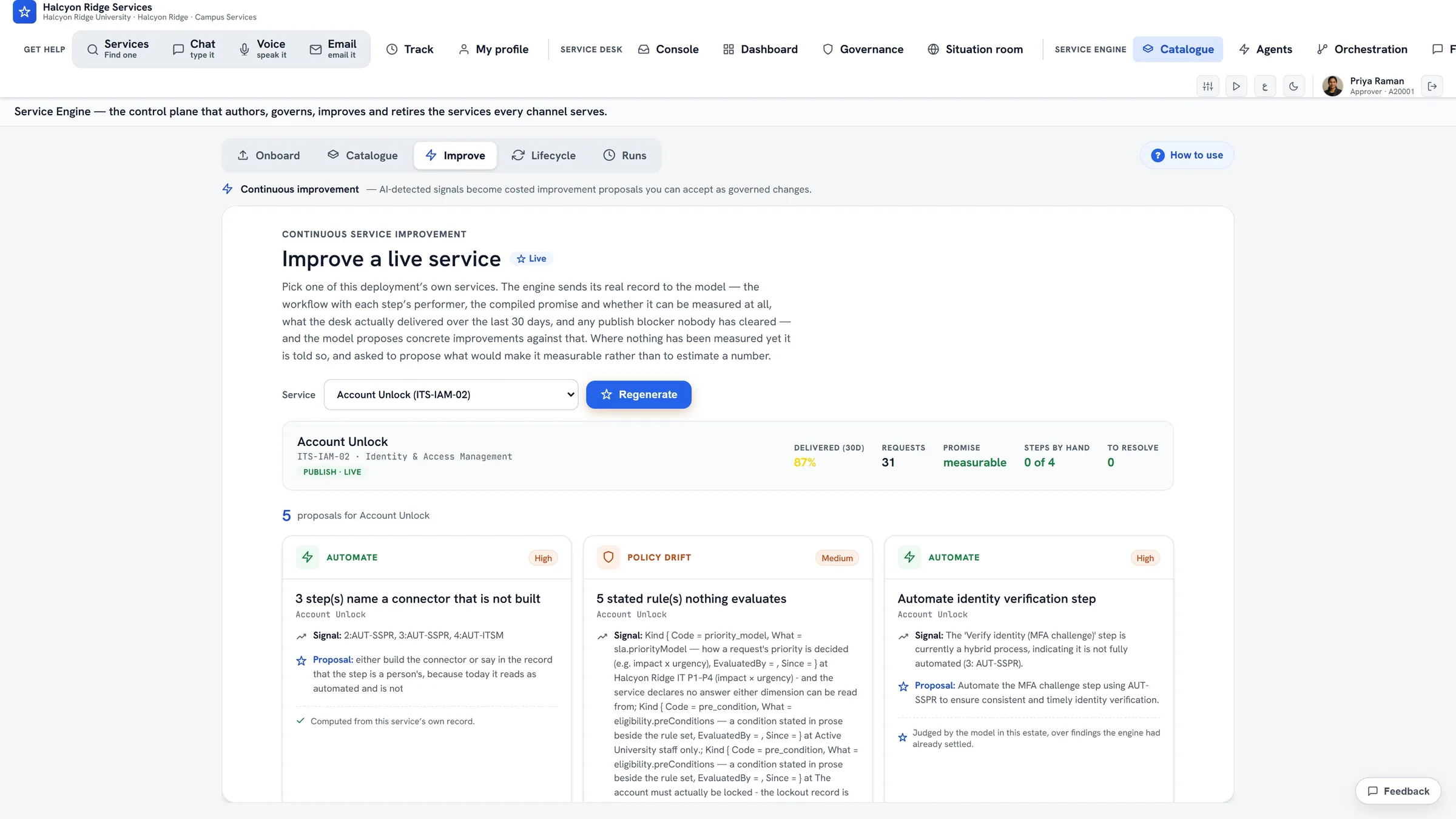
Intake and decisions are only half of it. ServiceOrbit also measures the operation and proposes its own improvements, and a person decides on each one. Both views are from the working product; the figures are sample data.
THE SERVICE ENGINE · THE DIFFERENTIATOR
It writes its own catalogue.
Most service desks make you author every service by hand. ServiceOrbit reads a department's real documents and drafts a governed Standard Service Definition — policy, eligibility, evidence checklist, routing. Approve and publish, and the live assistant starts serving it the same minute.
- ● Onboard from documents — upload a real PDF/DOCX; the engine authors the service.
- ● Govern it — review the policy, eligibility criteria, and routing before anything goes live.
- ● Publish to D1 (the live database) — the chat, voice, and email channels start serving it instantly.
- ● Improve it — continual-improvement (CSI) proposals per service, grounded in its own record; a person decides.
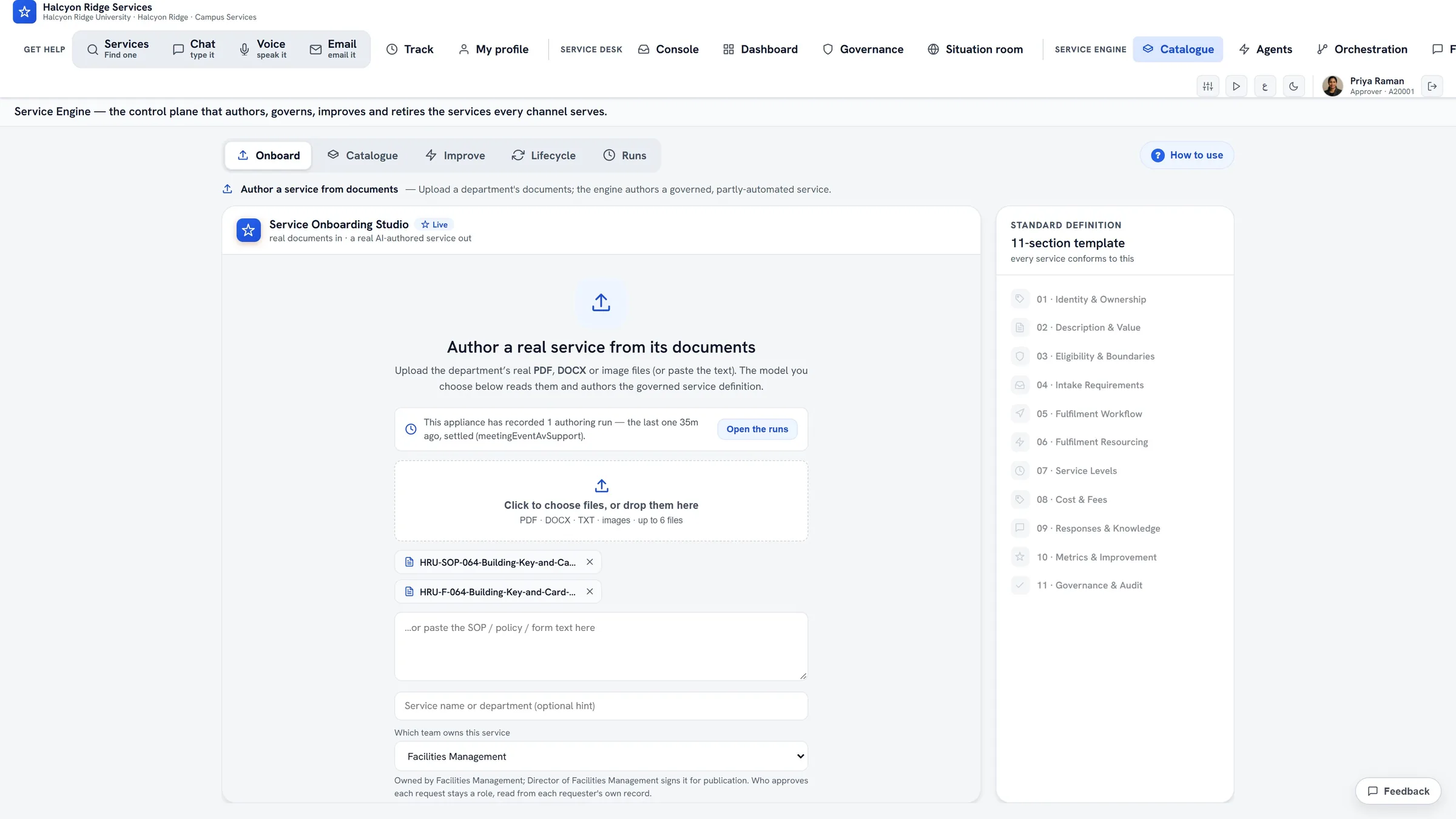
Onboard → Author → Publish
Drop a department's procedure and request form; the engine drafts a governed service against an 11-section template. Nothing goes live until a person reviews it and publishes.
THE GOVERNED STANDARD
Every service follows one lifecycle, one definition.
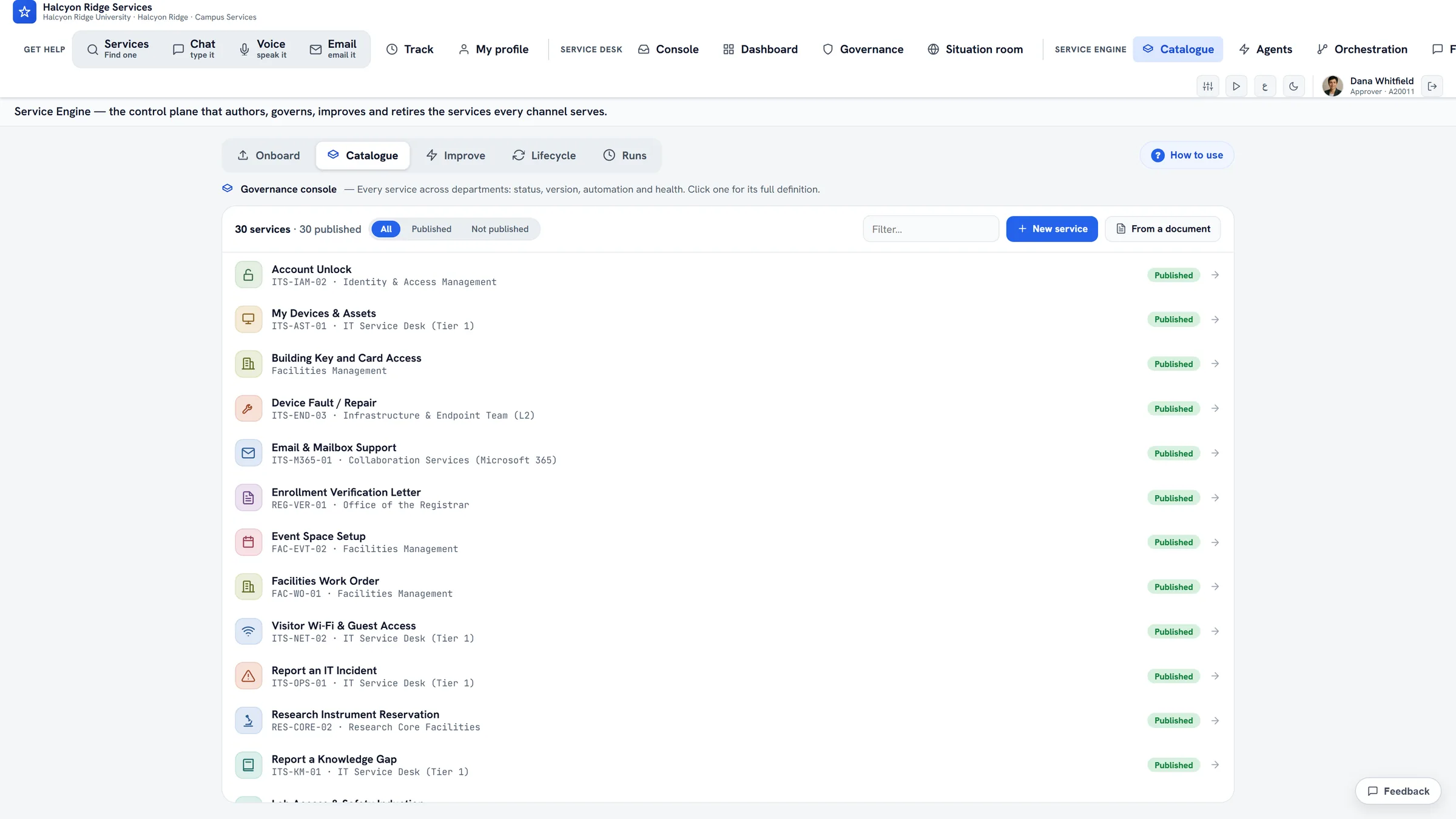
Behind the catalogue is a governed standard: each service moves through propose → author → govern → publish → operate → improve → retire, and conforms to one 11-section Standard Service Definition. From the working product.
THE WORKSPACE
What approvers and requesters actually open.
The channels are how requests come in. These are the surfaces where the work gets decided, tracked, and improved.
Console
AI-drafted tickets, traced evidence, a persisted AI recommendation, and one-click decisions.
Dashboard
Live ops — backlog, SLA attainment by service, throughput, and how often approvers agree with the AI.
Track
An SLA ring, stage progress, and proactive AI updates on where the request stands.
Lifecycle
An orchestration map of all eight stages — where AI runs vs. where humans keep judgement.
Catalogue
The control plane that authors, governs, improves, and retires the services the channels serve.
Improve
Proposes continual-improvement (CSI) changes per service from its own record — a person accepts or declines each one.
DECISIONS, NOT DATA ENTRY
Approvers decide. The engine did the legwork.
By the time a request reaches a person, it's already a clean ticket: evidence parsed, eligibility checked criterion by criterion, and a recommendation judged against the real policy. The approver reads, sanity-checks, and clicks — minutes of judgement instead of hours of triage.

MULTI-TENANT BY DESIGN
One platform, many desks.
The same engine re-skins its brand, accounts, catalogue, and AI framing per client. Tickets, metrics, and demo resets are tenant-scoped — one client's queue never touches another's. The five desks below are invented organizations from the demo and our films, not customers.
Halcyon Ridge University
Higher education
A campus-wide desk: students, housing, the registrar, facilities and labs.
Kestrel Bay Medical Center
Hospital
Clinical equipment repair, patient transport and clinical system access, with people deciding.
Tallbrook Manufacturing
Manufacturing
Machine breakdowns, safety permits and onboarding, built from the plant’s own procedures.
Brightmere Bank
Banking
Access requests checked in code, approved in order, with separation of duties.
City of Stillbrook
City government
Street repairs, public records and event permits, routed straight to the right crew.
Each organization is a fully separate desk on shared infrastructure: its own catalogue, people, rules and branding.
Open the live demoTHE LIVE DEMO
Nothing scripted. Every answer is live.
The demo is the working product on Halcyon Ridge University, an invented campus: real model calls for intake, document reading, approver recommendations and service authoring. Because it is live, it is by invitation. Ask for access and we will add your email. There is no self-serve or 14-day trial for ServiceOrbit; that trial is for AxiomAI.
Sign in as anyone
Pick a student, a member of staff or an approver from the persona cards and see the desk from their side. Every person and record is invented.
By invitation
The door checks your email with a one-time code before the demo opens. Request access.
HOW IT'S BUILT
Edge-native, and honest about the model.
Cloudflare Workers + D1
Next.js on the edge via OpenNext; serverless SQLite for tickets, events, and the published catalogue.
In-memory document parsing
Uploads are parsed in memory; only the extracted fields persist, and the raw files are discarded.
Zero-retention model calls
The LLMs ServiceOrbit calls operate under zero-retention API terms. We never train on your content.
Geofence-ready egress
An optional proxy routes model traffic for regions that geoblock OpenAI — Workers run near your users.
Same data commitments as the rest of Dendrites AI — see our data practices.
Is ServiceOrbit FERPA or HIPAA compliant? We do not claim that, and ServiceOrbit holds no such certification. It reads the requester's own record from your directory, and from student or HR systems if you connect them, to fill in a request. So each deployment is reviewed with your privacy office (for a university, also the registrar) before it goes live, and fields you mark as sensitive can stay on a model you host or never reach a model at all.
PRICING
ServiceOrbit is scoped and quoted for each organization, usually starting with a pilot on a few of your services. It is not on the AxiomAI plans listed on the pricing page.
SEE IT FOR YOURSELF
Walk a request from words to done.
Open the live demo, pick a tenant, and watch a plain-language request become a validated, routed ticket across chat, voice, and email.